Thursday, September 20, 2007

Java FX Script

The JavaFX Script programming language (known as JavaFX) is a declarative, statically typed scripting language from Sun Microsystems, Inc. As mentioned on the Open JavaFX (OpenJFX) web site, JavaFX technology has a wealth of features, including the ability to make direct calls to Java technology APIs. Because JavaFX Script is statically typed, it also has the same code structuring, reuse, and encapsulation features; such as packages, classes, inheritance, and separate compilation and deployment units, which make it possible for you to create and maintain very large programs using Java technology.

This article will help you get started with the JavaFX programming language is an introduction to the JavaFX programming language, targeted to those who are already familiar with Java technology and the basics of scripting languages.

The JavaFX Pad Application
If you have a Java Runtime Environment (JRE) on your system, the easiest way to get started with JavaFX technology is to fire up the Java Web Start-enabled demonstration program, JavaFX Pad. Once you start the application, you should see a screen similar to what appears in Figure 1

Figure 1. The JavaFX Pad Application Running on Microsoft Windows OS, JDK 6

JavaFX Pad starts with a default application already loaded, which it immediately executes. The JavaFX Pad application is a great way to see exactly what you're doing at runtime, modifying changes as you go, and instantaneously seeing the results

JavaFX Technology: A Statically Typed Language

The JavaFX programming language is a scripting language with static typing. What exactly does this mean? Consider the following:

var myVariable = "Hello";

This declaration, similar to what you may find in JavaScript technology, creates a variable called myVariable and assigns it the string value Hello. However, after declaring the variable, let's try to assign it something other than a string:

myVariable = 12345;

Because the code does not use quotation marks around 12345, this variable is now being assigned an integer instead of a string. In JavaScript technology, dynamically retyping the variable will work fine. However, a statically typed language such as JavaFX will not allow this. This is because myVariable was initially declared as a String type, and the code later tries to reassign it as an integer. With JavaFX, a variable that is declared as a String must remain a String.

In fact, if you enter those two lines of code into the JavaFX Pad demo, you'll immediately see an error at the bottom of the window, as shown in Figure 2.

Thursday, September 13, 2007

Using EJB with AJAX

AJAX

AJAX is an acronym for Asynchronous JavaScript And XML. AJAX is not a new programming language, but simply a new technique for creating better, faster, and more interactive web applications. AJAX uses JavaScript to send and receive data between a web browser and a web server.

It makes web pages more responsive by exchanging data with the web server behind the scenes, instead of reloading an entire web page each time a user makes a change. AJAX is a technology that runs in your browser. It uses asynchronous data transfer (HTTP requests) between the browser and the web server, allowing web pages to request small bits of information from the server instead of whole pages. It makes Internet applications smaller, faster and more users friendly.

What is it?
A traditional web application will submit input (using an HTML form) to a web server. After the web server has processed the data, it will return a completely new web page to the user.
Because the server returns a new web page each time the user submits input, traditional web applications often run slowly and tend to be fewer users friendly.

With AJAX, web applications can send and retrieve data without reloading the whole web page. This is done by sending HTTP requests to the server (behind the scenes), and by modifying only parts of the web page using JavaScript when the server returns data.
XML is commonly used as the format for receiving server data, although any format, including plain text, can be used.

The standard and well-known method for user interaction with web-based applications involves the user entering information (e.g. filling out a form), submitting that information to the server, and awaiting a page refresh or redirect to return the response from the server.
This is at times frustrating for the user, besides being rather different to the 'desktop' style of user interface with which (s)he may be more familiar.
Ajax (Asynchronous Javascript And XML) is a technique (or, more correctly, a combination of techniques) for submitting server requests 'in the background' and returning information from the server to the user without the necessity of waiting for a page load.
Ajax is actually a combination of several technologies working together to provide this capability.
How does it work?
Instead of a user request being made of the server via, for example, a normal HTTP POST or GET request, such as would be made by submitting a form or clicking a hyperlink, an Ajax script makes a request of a server by using the Javascript XMLHTTPRequest object.
Although this object may be unfamiliar to many, in fact it behaves like a fairly ordinary javascript object. As you may well know, when using a javascript image object we may dynamically change the URL of the image source without using a page refresh. XMLHTTPRequest retrieves information from the server in a similarly invisible manner.
AJAX in EJB:

Enterprise applications can use Ajax to provide better Web interfaces that increase the user productivity. In many cases, it is possible to submit a partially completed form to obtain useful information from the server application. For example, the server could perform some early validation or it could use the partial user input to suggest values for the empty form fields, speeding up the data entry process. Ajax can also be used to connect to data feeds whose information is displayed without refreshing the whole page.

The following diagram depicts the EJB-AJAX application's architecture:


Thursday, August 23, 2007

WSDL and UDDI

Understanding WSDL and UDDI
Web Services Description Language (WSDL) is one of the prime specifications in web services, the other two being SOAP and UDDI. WSDL is the description language for web services that describes a set of SOAP messages and how these messages are exchanged across network. WSDL will be in XML format; therefore it can be easily understood and edited by humans and machines.

Another advantage of WSDL being in XML format is that it is programming language independent and also platform independent. In addition, WSDL defines where the web service is available from and what communications protocol has been used to talk to the web service. As a result the WSDL file describes everything that is required to write a program for an XML Web service.

There are tools available in Microsoft Visual Studio .NET to read a WSDL file and generate the code required to communicate with an XML Web service.

Universal Discovery Description Language (UDDI) is a directory where you can expose your web services for other users to easily access it. You can also consume the web service that is already posted in UDDI. However, you can also post a web service without registering it in UDDI.

DISCO is another directory where you can post your web service. But if you want to reach to maximum of customers, you can place it in UDDI. The UDDI directory offers three parts for you to register:

• White Pages
• Yellow Pages
• Green Pages

The white pages consist of the description such as name and address of the company offering the service.

The yellow pages consist of industrial categories based on standard taxonomies such as North American Industry Classification System and Standard Industrial Classification.

The green pages describe the interface to the web service in detail so that anyone can write an application after using the web service.

Web services are described in UDDI directory through a document called Type Model or tmodel. Normally, this tModel contains a WSDL file that describes a SOAP interface to an XML Web service, but the tModel is flexible enough to describe almost any kind of web service.

Apart from using the web services from UDDI, you can also search a particular web service in UDDI. In addition, you can search for companies’ information that posted web services. In certain times, you might know the names of the companies that offer web services but you may not be aware of the web services that they offer.

The WS Inspection is a specification in UDDI that allows you to search for a collection of web services that are located in a particular company name. You can evaluate these web services according to your requirements.

Wednesday, August 8, 2007

WI-FI

Why / Where Should We Use Wi-Fi
The Wi-Fi LAN has a broad application nowadays. Because of the comfortable and quick installation people often replace old wired LANs with Wi-Fi. Such connection allows to move your machine around the place without losing the Internet or other network resources. Working on your laptop you can check your mail from anywhere in your home or office.

Some highly attended places like airports, libraries, schools or even coffee bars offer you constant Internet connection using exactly wireless LAN, so retrieving new files, cruising the global network or corresponding with others will not be a problem anymore in those (and many other) places.

The most important shortcoming in Wi-Fi is the range. So far we may have difficulties in making a connection with a receiver which is more than 50-75 meters away (inside the buildings).

The signal should be stronger to provide larger connectable spaces. Additionally, some of the wireless adapters works on the frequencies that are currently used by many other wireless devices. It can cause a serious interference, so the connection performance can be quite poor.

However, building Wi-Fi network is often the cheapest way to achieve the desired connection with the surroundings. The price of a single wireless adapter is decreasing almost every day, so making a large network area by means of Wi-Fi is the most reasonable way. You will not need to arrange all the wires around and profit by the installation time. By the way, most of the Wi-Fi adapters have user-friendly configuration and diagnostic tools which can help you to adjust or change your WLAN settings or even can do everything for you.

Security:
What about the security? Is there a possibility of stealing our data? Security is your personal decision, but having a wireless connection we should pay attention to protect our private files and encrypt sent messages.

Actually, the security modules were very important since the beginning of the Wi-Fi projection. In order to prevent intercepting your data by the others the designers implemented many security techniques, like Wi-Fi Protected Access (based on encryption), Virtual Private Network (making virtual "tunnels"), Media Access Control Filtering (rejecting unknown MAC addresses), RADIUS Authentication and Authorization (using login and password) or Kerberos (key distribution).

There is also a possibility to combine some of these security mechanisms making your transmissions even more secure.On the other hand providing such security in public places (like Internet cafes) may not meet its expectations. Connecting to protected wireless network you will be asked about a security code, encryption key or a password. If you do not know them, you will not be able to establish a communication link and use Internet resources.

Most of public areas do not use security modules because of that reason making Wi-Fi users data unsafe.

Monday, July 30, 2007

ADO.NET 2.0 – Part 2

In the previous articles I have discussed 8 new features of ADO.NET 2.0, following are the remaining.

9. DataReader’s New Execute Methods
Now command object supports more execute methods. Besides old ExecuteNonQuery, ExecuteReader, ExecuteScaler, and ExecuteXmlReader, the new execute methods are ExecutePageReader, ExecuteResultSet, and ExecuteRow.
Figure 2 shows all of the execute methods supported by the command object in ADO.NET 2.0.


Figure 2. Command's Execute methods.

10. Improved Performance for DataSet Remoting
If we think about ADO.NET 1.x DataSet, the major problem which is DataSet Serialization. Microsoft has worked lots on this part and they have improved the performance of Serialization a lot. In ADO.NET 1.x, Serialization of DataSet will happen in XML format. Even in ADO.NET 2.0, by default it happens in XML format. But there is an option to change the Serialization format to Binary using property called "SerializationFormat". Look at the following code.

Dim format As New Binary.BinaryFormatter
Dim ds As New DataSet ds = DataGridView1.DataSource
Using fs As New FileStream("c:\sar1.bin", FileMode.CreateNew)
ds.RemotingFormat = SerializationFormat.Binary
'Other option is SerilaizationFormat.XML
format.Serialize(fs, ds)
End Using

In the above code snippet, we are serializing the dataset into filestream. If we look at the file size difference between XML and Binary formating, XML formating is more than three times bigger than Binary formating. If we see the perfomance of Remoting of DataSet when greater than 1000 rows, the binary formating is 80 times faster than XML formating.

11. DataSet and DataReader Transfer
In ADO.NET 2.0, we can load DataReader directly into DataSet or DataTable. Similarly we can get DataReader back from DataSet or DataTable. DataTable is now having most of the methods of DataSet. For example, WriteXML or ReadXML methods are now available in DataTable also. A new method "Load" is available in DataSet and DataTable, using which we can load DataReader into DataSet/DataTable. In other way, DataSet and DataTable is having method named "getDataReader" which will return DataReader back from DataTable/DataSet. Even we can transfer between DataTable and DataView. Check out the following example,

Dim dr As SqlDataReader
Dim conn As New SqlConnection(Conn_str)
conn.Open()
Dim sqlc As New SqlCommand("Select * from Orders", conn)
dr = sqlc.ExecuteReader(CommandBehavior.CloseConnection)
Dim dt As New DataTable("Orders")
dt.Load(dr)

12. Batch Updates
In previous versions of ADO.NET, if we do changes to DataSet and update using DataAdapter.update method. It makes round trips to datasource for each modified rows in DataSet. This fine with few records, but if there is more than 100 records in modified. Then it will make 100 calls from DataAccess layer to DataBase which is not acceptable. In this release, MicroSoft have changed this behaiour by exposing one property called "UpdateBatchSize". Using this we can metion how we want to groups the rows in dataset for single hit to database. For example if we want to group 50 records per hit, then we need to mention "UpdateBatchSize" as 50.

13. Common Provider Model
In our application if want to implement provider independent DataAccess, then we need to write our own factory classes for returning the required objects like connection, command. And for implementing this feature only provider independent interface were available in the previous releases. But in ADO.NET 2.0, we have separate factory classes for managing common provider model. A new class "DbProviderFactory" is included in this release which has two methods. One method "GetFactoryClasses" to get all the provider installed in that machine and other one "GetFactory" will be used to get provider specific object by providing provider name as paramter.

Check out the following example, in which without knowing which provider we are going to work on we are fetching values from database. We need to pass only "Providername" which can configurable and which can change.

Dim pf As DbProviderFactory pf = DbProviderFactories.GetFactory(providername)
Using dbc As DbConnection = pf.CreateConnection
dbc.ConnectionString = Conn_str dbc.Open()
Dim comm As DbCommand = dbc.CreateCommand
comm.CommandText = "Select * from orders"
Dim dr As DbDataReader = comm.ExecuteReader(CommandBehavior.CloseConnection)
Dim ldt As New DataTable("Orders") l
dt.Load(dr)
End Using

14. Bulk Copy
If we think of bulk copy i.e. if we want to move some data from one datasource to another datasource. If will simply think of doing this in database, since we dont have much options in the previous release. But in ADO.NET 2.0, we can do this from DataAccess Layer itself.
New class called "SQLBulkCopy" is included in this release which will do this work for us. Using this class we can metion which datasource we want to copy and to which destination table we want to copy. We can even map the columns between tables, by default it will copy columns to columns. Check out the following example,

Dim dr As SqlDataReader
Dim conn As New SqlConnection(Conn_str)
Dim conn1 As New SqlConnection(Conn_str1)
conn.Open()
conn1.Open()
Dim sqlc As New SqlCommand("Select * from Orders", conn)
'dr = sqlc.ExecutePageReader(CommandBehavior.CloseConnection, 10, 10)

dr = sqlc.ExecuteReader(CommandBehavior.CloseConnection)
Dim dt As New DataTable("Orders")
Dim bulkcopy As New SqlBulkCopy(conn1)
bulkcopy.DestinationTableName = "MVPOrders"
bulkcopy.WriteToServer(dr)

15. Multiple Active ResultSets
Using this feature we can have more than one simultaneous pending request per connection i.e. multiple active datareader is possible. Previously when a DataReader is open and if we use that connection in another datareader, we used to get the following error "Systerm.InvalidOperationException: There is already an open DataReader associated with this connection which must be closed first". This error wont come now, as this is possible now because of MAR's. This feature is supported only in Yukon.

16. Conclusion
ADO.NET 2.0 provides many new and improved features for developers to improve the performance and reduce the code. In this article, I discussed top 15 features of ADO.NET 2.0

Wednesday, July 18, 2007

ADO.NET 2.0 - Part 1

Following is the new Features of ADO.NET 2.0


1. Data Paging
Custom paging is one of the major requirements in ASP.NET. Similarly if we take windows application also, paging is an important feature that is required. In previous releases, we need to write stored procedure for doing paging in our applications.

But in ADO.NET, we can do is very simply. An new API "ExecutePageReader" in SQLCommand will do all the stuff for we and return only the required records. This method is very similar to ExecuteReader but it will accept two extra parameter. One is "Starting row number" and other one is for "number of rows". This will also return datareader. For example, check out the following code snippet.


Dim dr As SqlDataReader

Dim conn As New SqlConnection(Conn_str)

conn.Open()

Dim sqlc As New SqlCommand("Select * from Orders", conn)

dr = sqlc.ExecutePageReader(CommandBehavior.CloseConnection, 10, 10)

2. Asynchronous Data Access
In ADO.NET 1.x commands like ExecuteReader,ExecuteScalar and ExecuteNonQuery will synchronously execute and block the current thread. Even when we open connection to the database, current thread is blocked. But in ADO.NET 2.0, all of these methods comes with Begin and End methods to support asynchronous execution.

This asynchrounous methodology is very similar to our .NET framework asynchronous methodology. Even we can have callback mechanism using this approach.

This Asynchrounous Data Access is currently only supported in SQLClient, but complete API support is available for other providers to implement this mechanism.

3. Connection Details
Now we can get more details about a connection by setting Connection's StatisticsEnabled property to True. The Connection object provides two new methods - RetrieveStatistics and ResetStatistics. The RetrieveStatistics method returns a HashTable object filled with the information about the connection such as data transferred, user details, curser details, buffer information and transactions.

4. DataSet, RemotingFormat Property
When DataSet.RemotingFormat is set to binary, the DataSet is serialized in binary format instead of XML tagged format, which improves the performance of serialization and deserialization operations significantly.

5. DataTable’s Load and Save Methods
In previous version of ADO.NET, only DataSet had Load and Save methods. The Load method can load data from objects such as XML into a DataSet object and Save method saves the data to a persistent media. Now DataTable also supports these two methods.
We can also load a DataReader object into a DataTable by using the Load method.

6. New Data Controls
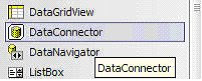
In Toolbox, we will see these new controls - DataGridView, DataConnector, and DataNavigator. See Figure 1. Now using these controls, we can provide navigation (paging) support to the data in data bound controls.


Figure 1. Data bound controls.

7. DbProvidersFactories Class
This class provides a list of available data providers on a machine. We can use this class and its members to find out the best suited data provider for database when writing a database independent applications.

8. Customized Data Provider
By providing the factory classes now ADO.NET extends its support to custom data provider. Now we don't have to write a data provider dependent code. We use the base classes of data provider and let the connection string does the trick for we.
Ohter features will be released in next article.

Wednesday, July 4, 2007

C++ and Java

Comparision of C++ and Java

Advantages Of C++
Each computer language has a niche which it is known for. C++ boasts object oriented programming which is very segmented, easy to work with, and doesn't require very many lines of code to perform simple tasks. Although C++ is backwards-compatible with its predecessor, the C language, C is not object oriented while C++ is.

C++ is perhaps one of the easiest computer languages to learn as much of the syntax is very straight-forward. In fact, it is often taught in many college classrooms as a first language for Computer Science majors.

The language is not to be underestimated, however, as it is still extremely flexible and functional in the workforce.Although C++ is a high-level language, it is very powerful in that it allows the programmer benefits otherwise only available in the assembly (low-level) language.

For example, programmers have much control over memory management, as can be demonstrated with arrays and linked lists.Yet another benefit of C++ is its ability to handle OOP, or object oriented programming.

By using functions and what are known as classes, certain parts of the code may be re-used multiple times throughout the program. For example, suppose a function was written to add two numbers being passed into it, and to print out the result.

This function can be re-used multiple times by passing in two different numbers, each time.Perhaps one of the most important advantages to C++, however, is its ability to work in cross-platform environments. This is because of an ANSI standard.

In other words, C++ code can be used to develop programs for vast operating systems including MS-DOS, Windows, Macintosh, UNIX and Linux, to name just a few. Unfortunately, GUI (graphical user interface) development in C++ among operating systems varies greatly.

Microsoft Visual C++, for example, allows for graphics in Windows. QT, meanwhile, can be used on UNIX-based machines.

Advantages Of Java
Java is a fairly new language which has been developed to improvise on C++. Unlike C++, it is completely object oriented.
The use of classes in development is not optional.Java also boasts easier to implement pointers than C++. Linked lists are extremely easy to develop.
In addition, many methods (functions) for almost everything you could imagine are pre-defined.One of the biggest advantages of Java over C++ is that GUI development is cross-platform. T
he exact same code can be run on virtually any operating system. For this reason, Java is a viable solution for many web-based applications.