Monday, July 30, 2007

ADO.NET 2.0 – Part 2

In the previous articles I have discussed 8 new features of ADO.NET 2.0, following are the remaining.

9. DataReader’s New Execute Methods
Now command object supports more execute methods. Besides old ExecuteNonQuery, ExecuteReader, ExecuteScaler, and ExecuteXmlReader, the new execute methods are ExecutePageReader, ExecuteResultSet, and ExecuteRow.
Figure 2 shows all of the execute methods supported by the command object in ADO.NET 2.0.


Figure 2. Command's Execute methods.

10. Improved Performance for DataSet Remoting
If we think about ADO.NET 1.x DataSet, the major problem which is DataSet Serialization. Microsoft has worked lots on this part and they have improved the performance of Serialization a lot. In ADO.NET 1.x, Serialization of DataSet will happen in XML format. Even in ADO.NET 2.0, by default it happens in XML format. But there is an option to change the Serialization format to Binary using property called "SerializationFormat". Look at the following code.

Dim format As New Binary.BinaryFormatter
Dim ds As New DataSet ds = DataGridView1.DataSource
Using fs As New FileStream("c:\sar1.bin", FileMode.CreateNew)
ds.RemotingFormat = SerializationFormat.Binary
'Other option is SerilaizationFormat.XML
format.Serialize(fs, ds)
End Using

In the above code snippet, we are serializing the dataset into filestream. If we look at the file size difference between XML and Binary formating, XML formating is more than three times bigger than Binary formating. If we see the perfomance of Remoting of DataSet when greater than 1000 rows, the binary formating is 80 times faster than XML formating.

11. DataSet and DataReader Transfer
In ADO.NET 2.0, we can load DataReader directly into DataSet or DataTable. Similarly we can get DataReader back from DataSet or DataTable. DataTable is now having most of the methods of DataSet. For example, WriteXML or ReadXML methods are now available in DataTable also. A new method "Load" is available in DataSet and DataTable, using which we can load DataReader into DataSet/DataTable. In other way, DataSet and DataTable is having method named "getDataReader" which will return DataReader back from DataTable/DataSet. Even we can transfer between DataTable and DataView. Check out the following example,

Dim dr As SqlDataReader
Dim conn As New SqlConnection(Conn_str)
conn.Open()
Dim sqlc As New SqlCommand("Select * from Orders", conn)
dr = sqlc.ExecuteReader(CommandBehavior.CloseConnection)
Dim dt As New DataTable("Orders")
dt.Load(dr)

12. Batch Updates
In previous versions of ADO.NET, if we do changes to DataSet and update using DataAdapter.update method. It makes round trips to datasource for each modified rows in DataSet. This fine with few records, but if there is more than 100 records in modified. Then it will make 100 calls from DataAccess layer to DataBase which is not acceptable. In this release, MicroSoft have changed this behaiour by exposing one property called "UpdateBatchSize". Using this we can metion how we want to groups the rows in dataset for single hit to database. For example if we want to group 50 records per hit, then we need to mention "UpdateBatchSize" as 50.

13. Common Provider Model
In our application if want to implement provider independent DataAccess, then we need to write our own factory classes for returning the required objects like connection, command. And for implementing this feature only provider independent interface were available in the previous releases. But in ADO.NET 2.0, we have separate factory classes for managing common provider model. A new class "DbProviderFactory" is included in this release which has two methods. One method "GetFactoryClasses" to get all the provider installed in that machine and other one "GetFactory" will be used to get provider specific object by providing provider name as paramter.

Check out the following example, in which without knowing which provider we are going to work on we are fetching values from database. We need to pass only "Providername" which can configurable and which can change.

Dim pf As DbProviderFactory pf = DbProviderFactories.GetFactory(providername)
Using dbc As DbConnection = pf.CreateConnection
dbc.ConnectionString = Conn_str dbc.Open()
Dim comm As DbCommand = dbc.CreateCommand
comm.CommandText = "Select * from orders"
Dim dr As DbDataReader = comm.ExecuteReader(CommandBehavior.CloseConnection)
Dim ldt As New DataTable("Orders") l
dt.Load(dr)
End Using

14. Bulk Copy
If we think of bulk copy i.e. if we want to move some data from one datasource to another datasource. If will simply think of doing this in database, since we dont have much options in the previous release. But in ADO.NET 2.0, we can do this from DataAccess Layer itself.
New class called "SQLBulkCopy" is included in this release which will do this work for us. Using this class we can metion which datasource we want to copy and to which destination table we want to copy. We can even map the columns between tables, by default it will copy columns to columns. Check out the following example,

Dim dr As SqlDataReader
Dim conn As New SqlConnection(Conn_str)
Dim conn1 As New SqlConnection(Conn_str1)
conn.Open()
conn1.Open()
Dim sqlc As New SqlCommand("Select * from Orders", conn)
'dr = sqlc.ExecutePageReader(CommandBehavior.CloseConnection, 10, 10)

dr = sqlc.ExecuteReader(CommandBehavior.CloseConnection)
Dim dt As New DataTable("Orders")
Dim bulkcopy As New SqlBulkCopy(conn1)
bulkcopy.DestinationTableName = "MVPOrders"
bulkcopy.WriteToServer(dr)

15. Multiple Active ResultSets
Using this feature we can have more than one simultaneous pending request per connection i.e. multiple active datareader is possible. Previously when a DataReader is open and if we use that connection in another datareader, we used to get the following error "Systerm.InvalidOperationException: There is already an open DataReader associated with this connection which must be closed first". This error wont come now, as this is possible now because of MAR's. This feature is supported only in Yukon.

16. Conclusion
ADO.NET 2.0 provides many new and improved features for developers to improve the performance and reduce the code. In this article, I discussed top 15 features of ADO.NET 2.0

Wednesday, July 18, 2007

ADO.NET 2.0 - Part 1

Following is the new Features of ADO.NET 2.0


1. Data Paging
Custom paging is one of the major requirements in ASP.NET. Similarly if we take windows application also, paging is an important feature that is required. In previous releases, we need to write stored procedure for doing paging in our applications.

But in ADO.NET, we can do is very simply. An new API "ExecutePageReader" in SQLCommand will do all the stuff for we and return only the required records. This method is very similar to ExecuteReader but it will accept two extra parameter. One is "Starting row number" and other one is for "number of rows". This will also return datareader. For example, check out the following code snippet.


Dim dr As SqlDataReader

Dim conn As New SqlConnection(Conn_str)

conn.Open()

Dim sqlc As New SqlCommand("Select * from Orders", conn)

dr = sqlc.ExecutePageReader(CommandBehavior.CloseConnection, 10, 10)

2. Asynchronous Data Access
In ADO.NET 1.x commands like ExecuteReader,ExecuteScalar and ExecuteNonQuery will synchronously execute and block the current thread. Even when we open connection to the database, current thread is blocked. But in ADO.NET 2.0, all of these methods comes with Begin and End methods to support asynchronous execution.

This asynchrounous methodology is very similar to our .NET framework asynchronous methodology. Even we can have callback mechanism using this approach.

This Asynchrounous Data Access is currently only supported in SQLClient, but complete API support is available for other providers to implement this mechanism.

3. Connection Details
Now we can get more details about a connection by setting Connection's StatisticsEnabled property to True. The Connection object provides two new methods - RetrieveStatistics and ResetStatistics. The RetrieveStatistics method returns a HashTable object filled with the information about the connection such as data transferred, user details, curser details, buffer information and transactions.

4. DataSet, RemotingFormat Property
When DataSet.RemotingFormat is set to binary, the DataSet is serialized in binary format instead of XML tagged format, which improves the performance of serialization and deserialization operations significantly.

5. DataTable’s Load and Save Methods
In previous version of ADO.NET, only DataSet had Load and Save methods. The Load method can load data from objects such as XML into a DataSet object and Save method saves the data to a persistent media. Now DataTable also supports these two methods.
We can also load a DataReader object into a DataTable by using the Load method.

6. New Data Controls
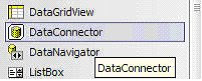
In Toolbox, we will see these new controls - DataGridView, DataConnector, and DataNavigator. See Figure 1. Now using these controls, we can provide navigation (paging) support to the data in data bound controls.


Figure 1. Data bound controls.

7. DbProvidersFactories Class
This class provides a list of available data providers on a machine. We can use this class and its members to find out the best suited data provider for database when writing a database independent applications.

8. Customized Data Provider
By providing the factory classes now ADO.NET extends its support to custom data provider. Now we don't have to write a data provider dependent code. We use the base classes of data provider and let the connection string does the trick for we.
Ohter features will be released in next article.

Wednesday, July 4, 2007

C++ and Java

Comparision of C++ and Java

Advantages Of C++
Each computer language has a niche which it is known for. C++ boasts object oriented programming which is very segmented, easy to work with, and doesn't require very many lines of code to perform simple tasks. Although C++ is backwards-compatible with its predecessor, the C language, C is not object oriented while C++ is.

C++ is perhaps one of the easiest computer languages to learn as much of the syntax is very straight-forward. In fact, it is often taught in many college classrooms as a first language for Computer Science majors.

The language is not to be underestimated, however, as it is still extremely flexible and functional in the workforce.Although C++ is a high-level language, it is very powerful in that it allows the programmer benefits otherwise only available in the assembly (low-level) language.

For example, programmers have much control over memory management, as can be demonstrated with arrays and linked lists.Yet another benefit of C++ is its ability to handle OOP, or object oriented programming.

By using functions and what are known as classes, certain parts of the code may be re-used multiple times throughout the program. For example, suppose a function was written to add two numbers being passed into it, and to print out the result.

This function can be re-used multiple times by passing in two different numbers, each time.Perhaps one of the most important advantages to C++, however, is its ability to work in cross-platform environments. This is because of an ANSI standard.

In other words, C++ code can be used to develop programs for vast operating systems including MS-DOS, Windows, Macintosh, UNIX and Linux, to name just a few. Unfortunately, GUI (graphical user interface) development in C++ among operating systems varies greatly.

Microsoft Visual C++, for example, allows for graphics in Windows. QT, meanwhile, can be used on UNIX-based machines.

Advantages Of Java
Java is a fairly new language which has been developed to improvise on C++. Unlike C++, it is completely object oriented.
The use of classes in development is not optional.Java also boasts easier to implement pointers than C++. Linked lists are extremely easy to develop.
In addition, many methods (functions) for almost everything you could imagine are pre-defined.One of the biggest advantages of Java over C++ is that GUI development is cross-platform. T
he exact same code can be run on virtually any operating system. For this reason, Java is a viable solution for many web-based applications.

Tuesday, June 26, 2007

XML - 10 Points

10 points - to Know XML

1. XML is for structuring data
Structured data includes things like spreadsheets, address books, configuration parameters, financial transactions, and technical drawings. XML is a set of rules (you may also think of them as guidelines or conventions) for designing text formats that let you structure your data. XML is not a programming language, and you don't have to be a programmer to use it or learn it. XML makes it easy for a computer to generate data, read data, and ensure that the data structure is unambiguous. XML avoids common pitfalls in language design: it is extensible, platform-independent, and it supports internationalization and localization. XML is fully Unicode-compliant.

2. XML looks a bit like HTML
Like HTML, XML makes use of tags (words bracketed by '<' and '>') and attributes (of the form name="value"). While HTML specifies what each tag and attribute means, and often how the text between them will look in a browser, XML uses the tags only to delimit pieces of data, and leaves the interpretation of the data completely to the application that reads it. In other words, if you see "

" in an XML file, do not assume it is a paragraph. Depending on the context, it may be a price, a parameter, a person, a p... (and who says it has to be a word with a "p"?).

3. XML is text, but isn't meant to be read
Programs that produce spreadsheets, address books, and other structured data often store that data on disk, using either a binary or text format. One advantage of a text format is that it allows people, if necessary, to look at the data without the program that produced it; in a pinch, you can read a text format with your favorite text editor. Text formats also allow developers to more easily debug applications. Like HTML, XML files are text files that people shouldn't have to read, but may when the need arises. Compared to HTML, the rules for XML files allow fewer variations. A forgotten tag, or an attribute without quotes makes an XML file unusable, while in HTML such practice is often explicitly allowed. The official XML specification forbids applications from trying to second-guess the creator of a broken XML file; if the file is broken, an application has to stop right there and report an error.

4. XML is verbose by design
Since XML is a text format and it uses tags to delimit the data, XML files are nearly always larger than comparable binary formats. That was a conscious decision by the designers of XML. The advantages of a text format are evident (see point 3), and the disadvantages can usually be compensated at a different level. Disk space is less expensive than it used to be, and compression programs like zip and gzip can compress files very well and very fast. In addition, communication protocols such as modem protocols and HTTP/1.1, the core protocol of the Web, can compress data on the fly, saving bandwidth as effectively as a binary format.

5. XML is a family of technologies
XML 1.0 is the specification that defines what "tags" and "attributes" are. Beyond XML 1.0, "the XML family" is a growing set of modules that offer useful services to accomplish important and frequently demanded tasks. XLink describes a standard way to add hyperlinks to an XML file. XPointer is a syntax in development for pointing to parts of an XML document. An XPointer is a bit like a URL, but instead of pointing to documents on the Web, it points to pieces of data inside an XML file. CSS, the style sheet language, is applicable to XML as it is to HTML. XSL is the advanced language for expressing style sheets. It is based on XSLT, a transformation language used for rearranging, adding and deleting tags and attributes. The DOM is a standard set of function calls for manipulating XML (and HTML) files from a programming language. XML Schemas 1 and 2 help developers to precisely define the structures of their own XML-based formats. There are several more modules and tools available or under development. Keep an eye on W3C's technical reports page.

6. XML is new, but not that new
Development of XML started in 1996 and it has been a W3C Recommendation since February 1998, which may make you suspect that this is rather immature technology. In fact, the technology isn't very new. Before XML there was SGML, developed in the early '80s, an ISO standard since 1986, and widely used for large documentation projects. The development of HTML started in 1990. The designers of XML simply took the best parts of SGML, guided by the experience with HTML, and produced something that is no less powerful than SGML, and vastly more regular and simple to use. Some evolutions, however, are hard to distinguish from revolutions... And it must be said that while SGML is mostly used for technical documentation and much less for other kinds of data, with XML it is exactly the opposite.

7. XML leads HTML to XHTML
There is an important XML application that is a document format: W3C's XHTML, the successor to HTML. XHTML has many of the same elements as HTML. The syntax has been changed slightly to conform to the rules of XML. A format that is "XML-based" inherits the syntax from XML and restricts it in certain ways (e.g, XHTML allows "
", but not ""); it also adds meaning to that syntax (XHTML says that "
" stands for "paragraph", and not for "price", "person", or anything else).

8. XML is modular
XML allows you to define a new document format by combining and reusing other formats. Since two formats developed independently may have elements or attributes with the same name, care must be taken when combining those formats (does "
" mean "paragraph" from this format or "person" from that one?). To eliminate name confusion when combining formats, XML provides a namespace mechanism. XSL and RDF are good examples of XML-based formats that use namespaces. XML Schema is designed to mirror this support for modularity at the level of defining XML document structures, by making it easy to combine two schemas to produce a third which covers a merged document structure.

9. XML is the basis for RDF and the Semantic Web
W3C's Resource Description Framework (RDF) is an XML text format that supports resource description and metadata applications, such as music playlists, photo collections, and bibliographies. For example, RDF might let you identify people in a Web photo album using information from a personal contact list; then your mail client could automatically start a message to those people stating that their photos are on the Web. Just as HTML integrated documents, images, menu systems, and forms applications to launch the original Web, RDF provides tools to integrate even more, to make the Web a little bit more into a Semantic Web. Just like people need to have agreement on the meanings of the words they employ in their communication, computers need mechanisms for agreeing on the meanings of terms in order to communicate effectively. Formal descriptions of terms in a certain area (shopping or manufacturing, for example) are called ontologies and are a necessary part of the Semantic Web. RDF, ontologies, and the representation of meaning so that computers can help people do work are all topics of the Semantic Web Activity.

10. XML is license-free, platform-independent and well-supported
By choosing XML as the basis for a project, you gain access to a large and growing community of tools (one of which may already do what you need!) and engineers experienced in the technology. Opting for XML is a bit like choosing SQL for databases: you still have to build your own database and your own programs and procedures that manipulate it, but there are many tools available and many people who can help you. And since XML is license-free, you can build your own software around it without paying anybody anything. The large and growing support means that you are also not tied to a single vendor. XML isn't always the best solution, but it is always worth considering.

Wednesday, June 13, 2007

C# vs VB.NET

Advantages of C# over VB.NET and vice versa
The choice between C# and VB.NET is largely one of subjective preference. Some people like C#'s terse syntax, others like VB.NET's natural language, case-insensitive approach.

Both have access to the same framework libraries. Both will perform largely equivalently (with a few small differences which are unlikely to affect most people, assuming VB.NET is used with Option Strict on).

Learning the .NET framework itself is a much bigger issue than learning either of the languages, and it's perfectly possible to become fluent in both. There are, however, a few actual differences which may affect your decision:


VB.NET Advantages

  • Support for optional parameters - very handy for some COM interoperability
  • Support for late binding with Option Strict off - type safety at compile time goes out of the window, but legacy libraries which don't have strongly typed interfaces become easier to use.
  • Support for named indexers (aka properties with parameters).
  • Various legacy VB functions (provided in the Microsoft.VisualBasic namespace, and can be used by other languages with a reference to the Microsoft.VisualBasic.dll). Many of these can be harmful to performance if used unwisely, however, and many people believe they should be avoided for the most part.
  • The with construct: it's a matter of debate as to whether this is an advantage or not, but it's certainly a difference.
  • Simpler (in expression - perhaps more complicated in understanding) event handling, where a method can declare that it handles an event, rather than the handler having to be set up in code.
  • The ability to implement interfaces with methods of different names. (Arguably this makes it harder to find the implementation of an interface, however.)
  • Catch ... When ... clauses, which allow exceptions to be filtered based on runtime expressions rather than just by type.
  • The VB.NET part of Visual Studio .NET compiles your code in the background. While this is considered an advantage for small projects, people creating very large projects have found that the IDE slows down considerably as the project gets larger.

C# Advantages

  • XML documentation generated from source code comments. (This is coming in VB.NET with Whidbey (the code name for the next version of Visual Studio and .NET), and there are tools which will do it with existing VB.NET code already.)
  • Operator overloading - again, coming to VB.NET in Whidbey.
  • Language support for unsigned types (you can use them from VB.NET, but they aren't in the language itself). Again, support for these is coming to VB.NET in Whidbey.
  • The using statement, which makes unmanaged resource disposal simple.
  • Explicit interface implementation, where an interface which is already implemented in a base class can be reimplemented separately in a derived class. Arguably this makes the class harder to understand, in the same way that member hiding normally does.
  • Unsafe code. This allows pointer arithmetic etc, and can improve performance in some situations. However, it is not to be used lightly, as a lot of the normal safety of C# is lost (as the name implies). Note that unsafe code is still managed code, i.e. it is compiled to IL, JITted, and run within the CLR.

Monday, May 28, 2007

OST [Open Source Technology]

Open Source advantages
What does Open Source mean and why is it so important to so many others ? We discuss this matter here, especially the advantages for businesses as yours.

``Open Source promotes software reliability and quality by supporting independent peer review and rapid evolution of source code. '' - opensource.org

Openness
All advantages of Open Source are a result of (ta-ta) its openness. Having the code makes it easy to resolve problems (by yourself or the next guy) which means that you don't have to rely on only one vendor for fixing potential problems. This is very important to understand everything that follows.

Stability
Since you can rely on anyone and since the license states that any modification shipped elsewhere should be equally open, this means that after a period of time Open Source software is more stable then most commercially distributed software. (beware: Open Source doesn't necessarily mean you don't have to pay for it, though it usually is a result of its freedom.)

Adaptability
Open Source software means Open Standards, thus it is easy to adapt software to work closely with other Open Source software and even closed protocols and proprietary applications. This solves vendor lock-in situations which ties your hands and knees to one and only one vendor if you choose one's products.

Quality
Not only does software evolve onto a stable product, a large userbase also supplies new possibilities, making it a feature-rich solution. More new features, less bugs and a broader (testing) audience (peer-review) are significant to the quality of a product.

Innovation
Competition is what drives innovation and Open Source keeps competition alive. As noone has any unfair advantages, everybody has the possibility to add value and provide services. Information wants to be free.

Security:
It is widely known that security by obscurity is not a secure practice in the long run. By opening the code and by wide adoption of Open Source software, it grows more secure. Generally, new Open Source projects tend to be insecure, but once a project matures and becomes production-ready, it is more reliable and more secure than most available commercial software.

Zero-price tag ?
Although Open Source doesn't necessarily mean that it doesn't cost a dime. Most Open Source software is freely available and doesn't cost any additional licenses per user/year. This allows us to cut down in price and spend more time to create more secure and adapted solutions than commercial consultancy firms.

Thursday, May 10, 2007

Linux

What is Linux ?
Linux is an open operating system available under the GPL. This means the source code is freely available.

Anyone distributing machine executable versions of this code, should also be able to provide the source code. Also any changes to the source code should be available under the same licensing conditions.

Linux is mainly developed by volunteers all over the world, although the IT industry starts contributing as well.


Linux runs on widely differing hardware platforms ranging from small embedded systems over commodity personal computers to huge clusters for processor intensive jobs like scientific calculations or 3D rendering.

CPU architectures supported include IA32 (Intel, AMD, Cyrix,...), IA64 (Intel), m68k (Motorola), PowerPC(IBM/Motorola), Sparc (Sun), Sparc64 (Sun), MIPS, ARM, Alpha (Compaq/Digital).


Technically the term 'Linux' denotes only the kernel of the operating system. Various companies and groups of volunteers have build Linux distributions around this kernel.

A Linux distribution contains all necessary tools and programs to install and maintain the system, perform basic operations and develop software. In addition to this a number of applications are also included such as a web browser, MUA, news reader, bitmap editor, audio manipulation tools,... Almost all of these application programs carry a similar open license as the Linux kernel.


Key advantages of Linux
Linux source code is freely distributed- Tens of thousands of programmers have reviewed the source code to improve performance, eliminate bugs, and strengthen security. No other operating system has ever undergone this level of review. This Open Source design has created most of the advantages listed below.


Linux has the best technical support available- Linux is supported by commercial distributors, consultants, and by a very active community of users and developers. In 1997, the Linux community was awarded InfoWorld's Product of the Year Award for Best Technical Support over all commercial software vendors.


Linux has no vendor lock-in.- The availability of source code means that every user and support provider is empowered to get to the root of technical problems quickly and effectively. This contrasts sharply with proprietary operating systems, where even top-tier support providers must rely on the OS vendor for technical information and bug fixes.


Linux runs on a wide range of hardware-Most Linux systems are based on standard PC hardware, and Linux supports a very wide range of PC devices. However, it also supports a wide range of other computer types, including Alpha, Power PC, 680x0, SPARC, and Strong Arm processors, and system sizes ranging from PDAs (such as the PalmPilot) to supercomputers constructed from clusters of systems (Beowulf clusters).


Linux is exceptionally stable- Properly configured, Linux systems will generally run until the hardware fails or the system is shut down. Continuous up-times of hundreds of days (up to a year or more) are not uncommon.


Linux has the tools and applications you need- Programs ranging from the market-dominating Apache web server to the powerful GIMP graphics editor are included in most Linux distributions. Free and commercial applications meet are available to meet most application needs.


Linux interoperates with many other types of computer systems- Linux communicates using the native networking protocols of Unix, Microsoft Windows 95/NT, IBM OS/2, Netware, and Macintosh systems and can also read and write disks and partitions from these and other operating systems.


Linux has a low total cost of ownership-Although the Linux learning curve is significant, the stability, design, and breadth of tools available for Linux result in very low ongoing operating costs.

Linux: ``all for one and one for all?? All changes one makes in Open Source software will benefit each and everyone, all over the world. Without exceptions or constraints.

Linux is fun!